


JENDA umělá inteligence
Apache License Version 2.0 — https://www.apache.org/licenses/LICENSE-2.0
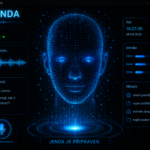
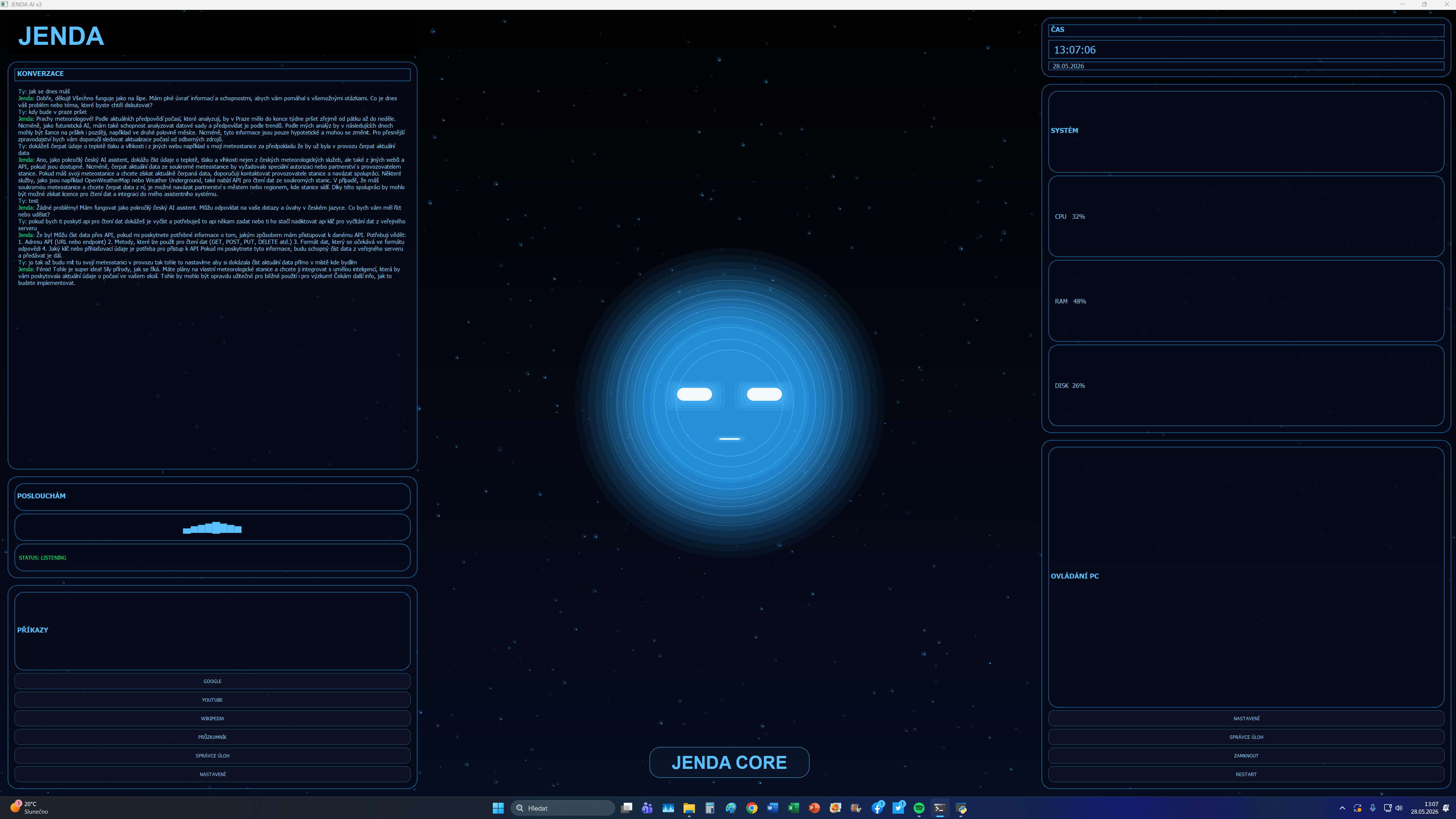
V současné podobě JENDA AI disponuje grafickým animovaným UI. Komunikace s JENDOU probíhá v českém jazyce a stále zůstavá i možnost psát textové konverzace. Funguje plně offline s využitím HW počítače avšak umí si potřebné znalosti a data stáhnout z internetu a na povel i různé informace uložit na disk trvale.
HW mého PC beru jako doporučený a instalace na výkonově slabší PC je riziko každého kdo si JENDU zprovozní.
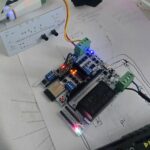
RYZEN 9 5900X 12-Core – GeForce RTX 3070Ti 8Gb – DDR4 RAM 32GB – SSD 1Tb, Win11 x64
UKÁZKA FUNKČNOSTI AI S PŘEDCHOZÍ GRAFIKOU
JEDNOTLIVÉ INFOMACE PRO NÁVOD ZPROVOZNĚNÍ JENDY BUDU VKLÁDAT POSTUPNĚ, jedná se o poměrně komplikovanou záležitost s využitím mnoha komponent a cílem je vytvořit takový návod na jehož základě si každý kdo ovláda počítač alespoň na střední urovni s minimálním základem programování bude moci sám zprovoznit umělou inteligenci.
Po dokončení návodu vložím i některé soubory ke stažení v komprimované složce.
POSLEDNÍ ZMĚNA 16.7. 2026
PRO VEŠKERÉ ZDE UVEDENÉ ZDROJOVÉ KÓDY JE NUTNÉ VYUŽÍVAT KÓDOVÁNÍ UTF-8
Vytvořte složku s názvem johntron
Instalace i spouštění bude probíhat pomocí terminálu otevřeného z této složky.
Pro snadné spuštění jako běžnou aplikaci vytvoříme soubor start.bat
Spouštění JENDY na mém počítači probíhá z disku G:\ …. označení jednotky nastavte podle disku na kterém bude AI uložena a spouštěna.
(JENDU spusťte až budou úspěšně dokončeny veškeré kroky)
Obsah souboru start.bat:
@echo off

cd /d G:\johntron

call .\venv\Scripts\activate

python main.py

pause
1) Stáhněte a nainstalujte program MICROSOFT Visual Studio Code. Program je zdarma.
2) Stáhněte si PyInstaller (ZDE)
pip install pyinstaller
pyinstaller --onefile main.py
3) Stáhněte a nainstalujte lokální/offline AI model Ollama (ZDE)
ollama run mistral4)
pokračování příště ….
ui.py
# =========================================================
# JENDA AI v3 - BLUE CINEMATIC EDITION
# =========================================================
import math
import random
from datetime import datetime
import numpy as np
import sounddevice as sd
from PyQt5.QtCore import Qt, QTimer
from PyQt5.QtGui import (
QColor,
QPainter,
QPen,
QFont,
QLinearGradient
)
from PyQt5.QtWidgets import (
QWidget,
QLabel,
QTextEdit,
QVBoxLayout,
QHBoxLayout,
QFrame,
QPushButton
)
from commands import *
# =========================================================
# COLOR PALETTE
# =========================================================
BLUE_MAIN = "#2ea8ff"
BLUE_BRIGHT = "#5bc0ff"
BLUE_DARK = "#0a1630"
BLUE_SOFT = "#1f7cff"
TEXT = "#8fd3ff"
# =========================================================
# HUD PANEL
# =========================================================
class HudPanel(QFrame):
def __init__(self, title):
super().__init__()
self.setStyleSheet(f"""
QFrame {{
background-color: rgba(5,10,25,180);
border: 2px solid rgba(46,168,255,120);
border-radius: 26px;
}}
""")
layout = QVBoxLayout()
layout.setContentsMargins(16, 16, 16, 16)
title_label = QLabel(title)
title_label.setStyleSheet(f"""
color:{BLUE_BRIGHT};
font-size:18px;
font-weight:bold;
padding-bottom:8px;
""")
layout.addWidget(title_label)
self.setLayout(layout)
# =========================================================
# MAIN UI
# =========================================================
class UI(QWidget):
def __init__(self):
super().__init__()
self.setWindowTitle("JENDA AI v3")
self.showMaximized()
self.setStyleSheet("""
background:black;
""")
# =====================================================
# STATES
# =====================================================
self.audio_level = 0
self.rotation = 0
self.eye_blink = 1.0
self.blink_timer = 0
self.speak_pulse = 0
self.energy_phase = 0
self.ai_state = "JENDA CORE"
self.breath = 0
self.breath_dir = 1
# =====================================================
# AUDIO
# =====================================================
self.stream = sd.InputStream(
channels=1,
callback=self.audio_callback
)
self.stream.start()
# =====================================================
# PARTICLES
# =====================================================
self.particles = []
for _ in range(900):
self.particles.append({
"x": random.uniform(0, 1920),
"y": random.uniform(0, 1080),
"size": random.uniform(1, 4),
"speed": random.uniform(0.1, 0.9),
"alpha": random.randint(40, 255),
"depth": random.uniform(0.4, 1.8)
})
# =====================================================
# LAYOUT
# =====================================================
root = QHBoxLayout()
root.setContentsMargins(20, 20, 20, 20)
root.setSpacing(24)
# =====================================================
# LEFT
# =====================================================
left = QVBoxLayout()
left.setSpacing(18)
self.logo = QLabel("JENDA")
self.logo.setFont(QFont("Arial", 40, QFont.Bold))
self.logo.setStyleSheet(f"""
color:{BLUE_BRIGHT};
padding:10px;
""")
left.addWidget(self.logo)
# =====================================================
# CHAT PANEL
# =====================================================
self.chat_panel = HudPanel("KONVERZACE")
self.chat = QTextEdit()
self.chat.setReadOnly(True)
self.chat.setStyleSheet(f"""
background:transparent;
border:none;
color:{TEXT};
font-size:15px;
padding:6px;
""")
self.chat_panel.layout().addWidget(self.chat)
left.addWidget(self.chat_panel, 4)
# =====================================================
# VOICE
# =====================================================
self.voice_panel = HudPanel("POSLOUCHÁM")
self.wave_label = QLabel("▂▃▄▅▆▇")
self.wave_label.setAlignment(Qt.AlignCenter)
self.wave_label.setStyleSheet(f"""
color:{BLUE_BRIGHT};
font-size:28px;
padding:10px;
""")
self.voice_panel.layout().addWidget(self.wave_label)
self.voice_status = QLabel("STATUS: ONLINE")
self.voice_status.setStyleSheet(f"""
color:#00ff66;
font-size:14px;
padding:6px;
""")
self.voice_panel.layout().addWidget(self.voice_status)
left.addWidget(self.voice_panel, 1)
# =====================================================
# QUICK COMMANDS
# =====================================================
self.quick_panel = HudPanel("PŘÍKAZY")
quick_buttons = [
("GOOGLE", open_google),
("YOUTUBE", open_youtube),
("WIKIPEDIA", open_wikipedia),
("PRŮZKUMNÍK", open_explorer),
("SPRÁVCE ÚLOH", open_task_manager),
("NASTAVENÍ", open_settings)
]
for text, func in quick_buttons:
btn = QPushButton(text)
btn.clicked.connect(func)
btn.setStyleSheet(f"""
QPushButton {{
background-color: rgba(15,20,40,180);
border: 1px solid rgba(91,192,255,100);
border-radius: 14px;
color:{TEXT};
padding:12px;
font-size:13px;
}}
QPushButton:hover {{
background-color: rgba(46,168,255,60);
border: 1px solid rgba(91,192,255,220);
}}
""")
self.quick_panel.layout().addWidget(btn)
left.addWidget(self.quick_panel, 2)
root.addLayout(left, 2)
# =====================================================
# CENTER
# =====================================================
center = QVBoxLayout()
center.addStretch()
center.addStretch()
root.addLayout(center, 3)
# =====================================================
# RIGHT
# =====================================================
right = QVBoxLayout()
right.setSpacing(18)
# =====================================================
# CLOCK
# =====================================================
self.clock_panel = HudPanel("ČAS")
self.clock = QLabel("--:--:--")
self.clock.setStyleSheet(f"""
color:{BLUE_BRIGHT};
font-size:28px;
padding:6px;
""")
self.clock_panel.layout().addWidget(self.clock)
self.date_label = QLabel("")
self.date_label.setStyleSheet(f"""
color:{TEXT};
font-size:16px;
padding-left:6px;
""")
self.clock_panel.layout().addWidget(self.date_label)
right.addWidget(self.clock_panel)
# =====================================================
# SYSTEM
# =====================================================
self.system_panel = HudPanel("SYSTÉM")
self.cpu = QLabel("CPU 32%")
self.ram = QLabel("RAM 48%")
self.disk = QLabel("DISK 26%")
for lbl in [self.cpu, self.ram, self.disk]:
lbl.setStyleSheet(f"""
color:{TEXT};
font-size:16px;
padding:12px;
""")
self.system_panel.layout().addWidget(lbl)
right.addWidget(self.system_panel, 2)
# =====================================================
# PC CONTROL
# =====================================================
self.pc_panel = HudPanel("OVLÁDÁNÍ PC")
pc_buttons = [
("NASTAVENÍ", open_settings),
("SPRÁVCE ÚLOH", open_task_manager),
("ZAMKNOUT", lock_pc),
("RESTART", restart_pc)
]
for text, func in pc_buttons:
btn = QPushButton(text)
btn.clicked.connect(func)
btn.setStyleSheet(f"""
QPushButton {{
background-color: rgba(15,20,40,180);
border: 1px solid rgba(91,192,255,100);
border-radius: 14px;
color:{TEXT};
padding:12px;
font-size:13px;
}}
QPushButton:hover {{
background-color: rgba(46,168,255,60);
border: 1px solid rgba(91,192,255,220);
}}
""")
self.pc_panel.layout().addWidget(btn)
right.addWidget(self.pc_panel, 2)
root.addLayout(right, 2)
self.setLayout(root)
# =====================================================
# TIMERS
# =====================================================
self.clock_timer = QTimer()
self.clock_timer.timeout.connect(self.update_clock)
self.clock_timer.start(1000)
self.anim_timer = QTimer()
self.anim_timer.timeout.connect(self.animate)
self.anim_timer.start(16)
self.wave_timer = QTimer()
self.wave_timer.timeout.connect(self.animate_wave)
self.wave_timer.start(120)
# =========================================================
# AUDIO
# =========================================================
def audio_callback(
self,
indata,
frames,
time,
status
):
volume = np.linalg.norm(indata) * 10
self.audio_level = min(volume, 1.0)
# =========================================================
# CLOCK
# =========================================================
def update_clock(self):
now = datetime.now()
self.clock.setText(now.strftime("%H:%M:%S"))
self.date_label.setText(
now.strftime("%d.%m.%Y")
)
# =========================================================
# WAVE
# =========================================================
def animate_wave(self):
waves = [
"▁▂▃▄▅▆▇█",
"▂▃▄▅▆▇█▇",
"▃▄▅▆▇█▇▆",
"▄▅▆▇█▇▆▅"
]
self.wave_label.setText(
random.choice(waves)
)
# =========================================================
# ANIMATION
# =========================================================
def animate(self):
self.energy_phase += 0.03
self.breath += 0.45 * self.breath_dir
if self.breath > 10:
self.breath_dir = -1
if self.breath < -10:
self.breath_dir = 1
# blinking
self.blink_timer += 1
if self.blink_timer > 240:
self.eye_blink -= 0.12
if self.eye_blink <= 0.05:
self.eye_blink = 1.0
self.blink_timer = 0
# speaking
if self.audio_level > 0.12:
self.ai_state = "JENDA ACTIVE"
self.speak_pulse = min(
self.speak_pulse + 4,
100
)
else:
self.ai_state = "JENDA CORE"
self.speak_pulse = max(
self.speak_pulse - 3,
0
)
self.update()
# =========================================================
# PAINT
# =========================================================
def paintEvent(self, event):
super().paintEvent(event)
painter = QPainter(self)
painter.setRenderHint(
QPainter.Antialiasing
)
w = self.width()
h = self.height()
cx = w // 2
cy = h // 2
# =====================================================
# BACKGROUND GRADIENT
# =====================================================
gradient = QLinearGradient(0, 0, 0, h)
gradient.setColorAt(0, QColor(0, 0, 0))
gradient.setColorAt(1, QColor(5, 10, 30))
painter.fillRect(
self.rect(),
gradient
)
# =====================================================
# PARTICLES
# =====================================================
painter.setPen(Qt.NoPen)
for p in self.particles:
glow_size = p["size"] * (
2 + p["depth"]
)
painter.setBrush(
QColor(
46,
168,
255,
int(p["alpha"] * 0.2)
)
)
painter.drawEllipse(
int(p["x"] - glow_size / 2),
int(p["y"] - glow_size / 2),
int(glow_size),
int(glow_size)
)
painter.setBrush(
QColor(
120,
210,
255,
p["alpha"]
)
)
painter.drawEllipse(
int(p["x"]),
int(p["y"]),
int(p["size"]),
int(p["size"])
)
p["y"] += (
p["speed"] * p["depth"]
+ self.audio_level * 0.6
)
if p["y"] > h:
p["y"] = 0
p["x"] = random.randint(0, w)
# =====================================================
# FACE CORE
# =====================================================
face_radius = int(
210
+ self.breath
+ self.speak_pulse * 0.15
)
# aura
for i in range(12):
radius = face_radius + i * 18
alpha = 45 - i * 3
painter.setBrush(
QColor(
46,
168,
255,
alpha
)
)
painter.drawEllipse(
int(cx - radius),
int(cy - radius),
int(radius * 2),
int(radius * 2)
)
# energy rings
for i in range(8):
radius = int(
145
+ i * 26
+ math.sin(
self.energy_phase + i
) * 5
)
pen = QPen(
QColor(
91,
192,
255,
150 - i * 14
),
2
)
painter.setPen(pen)
painter.drawEllipse(
int(cx - radius),
int(cy - radius),
int(radius * 2),
int(radius * 2)
)
# =====================================================
# EYES
# =====================================================
eye_offset_x = 92
eye_y = cy - 40
eye_w = 92
eye_h = int(
34 * self.eye_blink
)
for glow in range(5):
alpha = 60 - glow * 10
painter.setBrush(
QColor(
91,
192,
255,
alpha
)
)
size_w = eye_w + glow * 16
size_h = max(
6,
eye_h + glow * 10
)
# left
painter.drawRoundedRect(
int(cx - eye_offset_x - size_w // 2),
int(eye_y - glow * 4),
int(size_w),
int(size_h),
18,
18
)
# right
painter.drawRoundedRect(
int(cx + eye_offset_x - size_w // 2),
int(eye_y - glow * 4),
int(size_w),
int(size_h),
18,
18
)
painter.setBrush(
QColor(
255,
255,
255,
240
)
)
painter.setPen(Qt.NoPen)
# left eye
painter.drawRoundedRect(
int(cx - eye_offset_x - eye_w // 2),
int(eye_y),
int(eye_w),
int(max(6, eye_h)),
18,
18
)
# right eye
painter.drawRoundedRect(
int(cx + eye_offset_x - eye_w // 2),
int(eye_y),
int(eye_w),
int(max(6, eye_h)),
18,
18
)
# =====================================================
# MOUTH
# =====================================================
mouth_width = int(
50
+ self.audio_level * 130
)
mouth_height = int(
5
+ self.audio_level * 18
)
for i in range(5):
painter.setBrush(
QColor(
91,
192,
255,
50 - i * 8
)
)
painter.drawRoundedRect(
int(cx - mouth_width // 2 - i * 4),
int(cy + 92 - i * 2),
int(mouth_width + i * 8),
int(mouth_height + i * 4),
10,
10
)
painter.setBrush(
QColor(
255,
255,
255,
220
)
)
painter.drawRoundedRect(
int(cx - mouth_width // 2),
int(cy + 92),
int(mouth_width),
int(mouth_height),
8,
8
)
# =====================================================
# BOTTOM TEXT
# =====================================================
text_width = 420
text_height = 80
text_x = cx - text_width // 2
text_y = h - 130
# glow box
painter.setBrush(
QColor(
10,
20,
40,
180
)
)
painter.setPen(
QPen(
QColor(
91,
192,
255,
120
),
2
)
)
painter.drawRoundedRect(
text_x,
text_y,
text_width,
text_height,
28,
28
)
painter.setPen(
QColor(
91,
192,
255,
255
)
)
painter.setFont(
QFont(
"Arial",
28,
QFont.Bold
)
)
painter.drawText(
text_x,
text_y,
text_width,
text_height,
Qt.AlignCenter,
self.ai_state
)
# =====================================================
# SCANLINES
# =====================================================
painter.setPen(
QPen(
QColor(
91,
192,
255,
10
),
1
)
)
for y in range(0, h, 4):
painter.drawLine(
0,
y,
w,
y
)
# =========================================================
# LOG
# =========================================================
def log_msg(self, text):
self.chat.append(text)
# =========================================================
# STATUS
# =========================================================
def set_mode(self, mode):
self.voice_status.setText(
f"STATUS: {mode}"
)voice.py
import speech_recognition as sr
import webrtcvad
import collections
import pyaudio
import subprocess
import os

# 🎤 Speech recognition
recognizer = sr.Recognizer()

# 🔊 VAD
vad = webrtcvad.Vad(2)

RATE = 16000
FRAME_DURATION = 30
FRAME_SIZE = int(RATE * FRAME_DURATION / 1000)

pa = pyaudio.PyAudio()

# 📁 Piper setup
BASE_DIR = os.path.dirname(os.path.abspath(__file__))
PIPER_PATH = os.path.join(BASE_DIR, "piper", "piper.exe")
MODEL_PATH = os.path.join(BASE_DIR, "piper", "cs_CZ-jirka-medium.onnx")
OUTPUT_FILE = os.path.join(BASE_DIR, "piper", "out.wav")


# 🔊 HLAS (PIPER)
def speak(text):
    print("JOHNTRON:", text)

    try:
        cmd = [
            PIPER_PATH,
            "--model", MODEL_PATH,
            "--output_file", OUTPUT_FILE
        ]

        process = subprocess.Popen(
            cmd,
            stdin=subprocess.PIPE,
            shell=False
        )

        process.communicate(input=text.encode("utf-8"))

        if os.path.exists(OUTPUT_FILE):
            os.startfile(OUTPUT_FILE)

    except Exception as e:
        print("PIPER ERROR:", e)


# 🎤 POSLECH (VAD)
def listen():
    print("🎤 VAD POSLOUCHÁ...")

    stream = pa.open(
        format=pyaudio.paInt16,
        channels=1,
        rate=RATE,
        input=True,
        frames_per_buffer=FRAME_SIZE
    )

    frames = []
    ring_buffer = collections.deque(maxlen=10)
    triggered = False

    try:
        while True:
            frame = stream.read(FRAME_SIZE, exception_on_overflow=False)
            is_speech = vad.is_speech(frame, RATE)

            if not triggered:
                ring_buffer.append((frame, is_speech))
                if len([f for f, s in ring_buffer if s]) > 6:
                    triggered = True
                    print("🟢 START")
                    frames.extend([f for f, _ in ring_buffer])
                    ring_buffer.clear()

            else:
                frames.append(frame)
                ring_buffer.append((frame, is_speech))

                if len([f for f, s in ring_buffer if not s]) > 8:
                    print("🔴 END")
                    break

    finally:
        stream.stop_stream()
        stream.close()

    audio = b"".join(frames)

    try:
        import io
        import wave

        wav_buffer = io.BytesIO()
        wf = wave.open(wav_buffer, "wb")
        wf.setnchannels(1)
        wf.setsampwidth(pa.get_sample_size(pyaudio.paInt16))
        wf.setframerate(RATE)
        wf.writeframes(audio)
        wf.close()

        wav_buffer.seek(0)

        with sr.AudioFile(wav_buffer) as source:
            audio_data = recognizer.record(source)

        text = recognizer.recognize_google(audio_data, language="cs-CZ")

        print("SLYŠENO:", text)
        return text.lower()

    except Exception as e:
        print("VAD ERROR:", e)
        return input("Ty: ").lower()
vision.py
import mss
import numpy as np

def screenshot():
    with mss.mss() as sct:
        img = sct.grab(sct.monitors[1])
        return np.array(img)
memory.py
import json
import os

FILE = "memory.json"

def load():
    if not os.path.exists(FILE):
        return []
    with open(FILE, "r", encoding="utf-8") as f:
        return json.load(f)

def save(text, response):
    data = load()
    data.append({"user": text, "ai": response})

    # limit paměti (posledních 50)
    data = data[-50:]

    with open(FILE, "w", encoding="utf-8") as f:
        json.dump(data, f, ensure_ascii=False, indent=2)

def get_context():
    data = load()
    return "\n".join([f"U: {x['user']}\nA: {x['ai']}" for x in data[-5:]])
main.py
import sys
from threading import Thread

from PyQt5.QtWidgets import QApplication

from ui import UI
from voice import speak, listen
from brain import ask_ai


# =========================================================
# QT APP
# =========================================================

app = QApplication(sys.argv)

ui = UI()

ui.show()


# =========================================================
# START MESSAGE
# =========================================================

print("🔥 JENDA START")

ui.set_mode("SPEAKING")

speak("Jenda je připraven")

ui.set_mode("IDLE")


# =========================================================
# MAIN LOOP
# =========================================================

def assistant_loop():

    while True:

        try:

            # =================================================
            # LISTENING
            # =================================================

            ui.set_mode("LISTENING")

            text = listen()

            if not text:
                continue

            print("SLYŠENO:", text)

            # =================================================
            # USER MESSAGE
            # =================================================

            try:
                ui.chat.append(f"<span style='color:#55ccff'>Ty:</span> {text}")
            except:
                pass

            # =================================================
            # THINKING
            # =================================================

            ui.set_mode("THINKING")

            response = ask_ai(text)

            print("JENDA:", response)

            # =================================================
            # AI MESSAGE
            # =================================================

            try:
                ui.chat.append(
                    f"<span style='color:#00ff99'>Jenda:</span> {response}"
                )
            except:
                pass

            # =================================================
            # SPEAKING
            # =================================================

            ui.set_mode("SPEAKING")

            speak(response)

            # =================================================
            # IDLE
            # =================================================

            ui.set_mode("IDLE")

        except Exception as e:

            print("MAIN LOOP ERROR:", e)

            ui.set_mode("IDLE")


# =========================================================
# THREAD
# =========================================================

thread = Thread(
    target=assistant_loop,
    daemon=True
)

thread.start()


# =========================================================
# RUN APP
# =========================================================

sys.exit(app.exec_())
internet.py
import requests

def search_web(query):
    try:
        url = f"https://api.duckduckgo.com/?q={query}&format=json"
        res = requests.get(url).json()

        if res.get("Abstract"):
            return res["Abstract"]

        if res.get("RelatedTopics"):
            return res["RelatedTopics"][0].get("Text", "")

        return "Na internetu jsem nic nenašel"

    except Exception as e:
        return f"Internet error: {e}"
control.py
import os
import webbrowser

def execute(text):
    t = text.lower()

    if "chrome" in t:
        os.system("start chrome")
        return "Otevírám Chrome"

    if "poznámkový blok" in t:
        os.system("notepad")
        return "Otevírám poznámkový blok"

    if "kalkulačka" in t:
        os.system("calc")
        return "Otevírám kalkulačku"

    if "složku" in t:
        os.system("explorer")
        return "Otevírám složky"

    if "youtube" in t:
        webbrowser.open("https://youtube.com")
        return "Otevírám YouTube"

    if "google" in t:
        query = t.replace("google", "")
        webbrowser.open(f"https://www.google.com/search?q={query}")
        return "Hledám na Google"

    return None
config.py
WAKE_WORD = "johntron"
MODEL = "mistral"
commands.py
import os
import webbrowser
import subprocess


# =========================================================
# WEB
# =========================================================

def open_youtube():

    webbrowser.open("https://youtube.com")


def open_google():

    webbrowser.open("https://google.com")


def open_wikipedia():

    webbrowser.open("https://wikipedia.org")


def search_google(query):

    url = f"https://www.google.com/search?q={query}"

    webbrowser.open(url)


# =========================================================
# FILES
# =========================================================

def open_documents():

    path = os.path.expanduser("~/Documents")

    os.startfile(path)


def open_downloads():

    path = os.path.expanduser("~/Downloads")

    os.startfile(path)


def open_pictures():

    path = os.path.expanduser("~/Pictures")

    os.startfile(path)


def open_explorer():

    subprocess.Popen("explorer")


# =========================================================
# SYSTEM
# =========================================================

def open_task_manager():

    subprocess.Popen("taskmgr")


def open_settings():

    subprocess.Popen("start ms-settings:", shell=True)


def shutdown_pc():

    os.system("shutdown /s /t 1")


def restart_pc():

    os.system("shutdown /r /t 1")


def lock_pc():

    os.system("rundll32.exe user32.dll,LockWorkStation")
brain.py
import ollama


SYSTEM_PROMPT = """
Jsi Jenda.
Pokročilý český AI asistent.

Mluv česky.
Odpovídej stručně, přirozeně a inteligentně.

Jsi futuristická AI.
"""


def ask_ai(prompt):

    try:

        response = ollama.chat(
            model="llama3",
            messages=[
                {
                    "role": "system",
                    "content": SYSTEM_PROMPT
                },
                {
                    "role": "user",
                    "content": prompt
                }
            ]
        )

        return response["message"]["content"]

    except Exception as e:

        return f"Chyba AI: {e}"
Veškeré zdrojové kódy jsou zde ke stažení. Z archivu je překopírujte do složky johntron na disk na kterém se bude JENDA spouštět. Nyní již bude stačit nainstalovat vše potřebné podle návodu.
(po dokončení návodu tento text v závorce vymažu)
Operační systém Windows má určitou nevýhodu a bohužel pro každou odpověď od JENDY se otevře aplikace Windows Media Player, kterou je po vyslechnutí vhodnější zavřít. Existují možnosti jak toto změnit, ale tomu se budu věnovat v budoucnosti podle časových možností. Za předpokladu, že budete využívat Linux, tak není nutné řešit zavírání aplikace audio přehrávače.
Jako pomocníka při tvorbě UMĚLÉ INTELIGENCE JENDA jsem využil ChatGPT (varianta zdarma)